Adding a new notes section to my blog
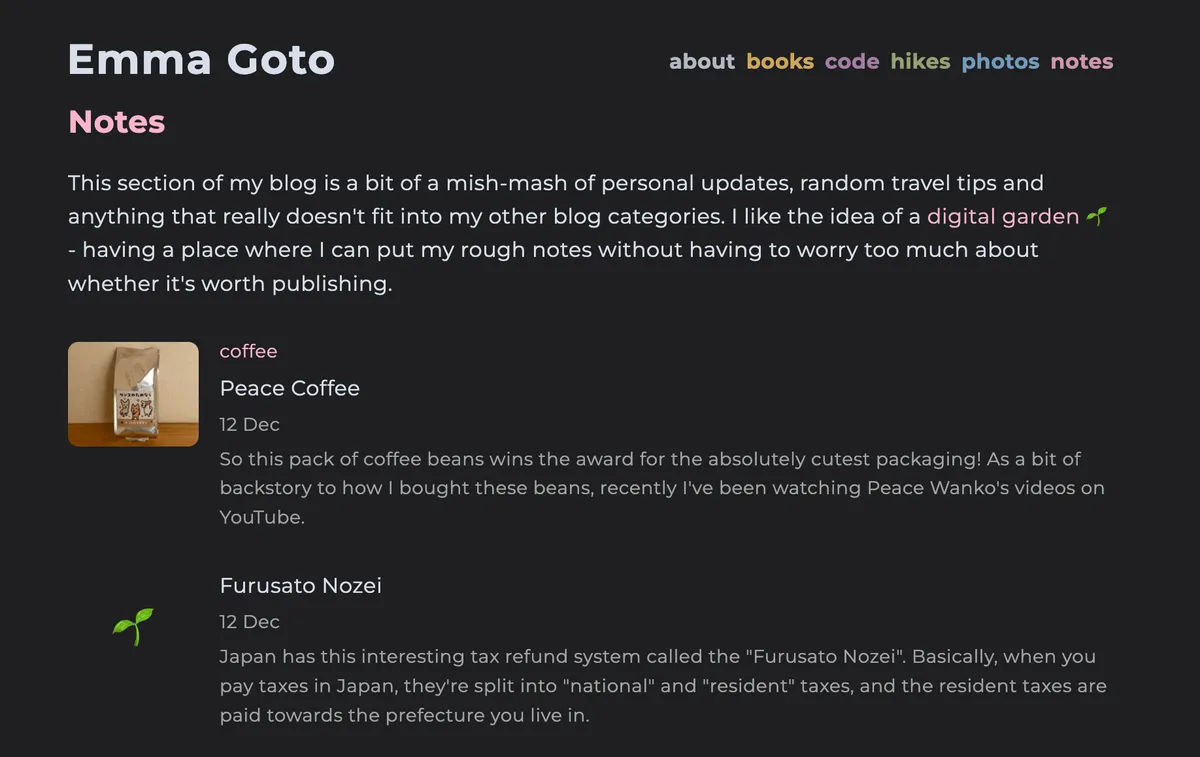
I’ve been publishing notes on my blog for a while now, but had them tucked away at the bottom of my now page. They also don’t show up on my home page’s feed, so they were quite easy to miss. This past week I’ve upgraded it to be one of the five main sections linked from my blog’s header navigation.
Why a notes section?
My post last year on digital gardens was when I first introduced notes to my website, and I’m realising now that I originally wrote that post a year ago, to this day (!) which is a huge coincidence. I think there must be something about my brain that wants to do a bit of digital note spring cleaning before we head into the new year.
Back then, my reason for publishing notes was so they could show up in Google search results if the information was useful to someone. But I didn’t want the pressure of making the notes feel polished, and so I didn’t link to them from my blog post’s home feed.
What prompted me to add them as a proper category to my blog was last week’s post on walking between Shibuya and Harajuku. It’s the sort of post that doesn’t quite fit into my other two main categories - programming or hiking - and I just wanted a proper section where it could “live” on my blog.
I’ve also been entertaining thoughts of starting to blog about coffee in Japan as well. For a little while I was debating whether to make a sixth section on my blog just for coffee, but I think for now it will work quite well living in my notes section.
Each of my sections has its own themed colour, so for a while I was trying to figure out what would work best for notes. I’ve settled on pink, and although to be honest I’m not much of a fan of the colour normally, it’s starting to grow on me.
Success with a notes section
My hopes with the notes section, as I mentioned on last year’s blog post:
… my intention with these is that if someone stumbles onto it via a Google search, and I see it in my Umami dashboard, that would be an indicator for me to start tending to that note and turn it into a proper post
Actually turned out to be pretty spot-on. I originally wrote a note about my experiences with using Cursor for programming, and I noticed a sudden uptick in views to that note. These are all the people just finding it via Google search:
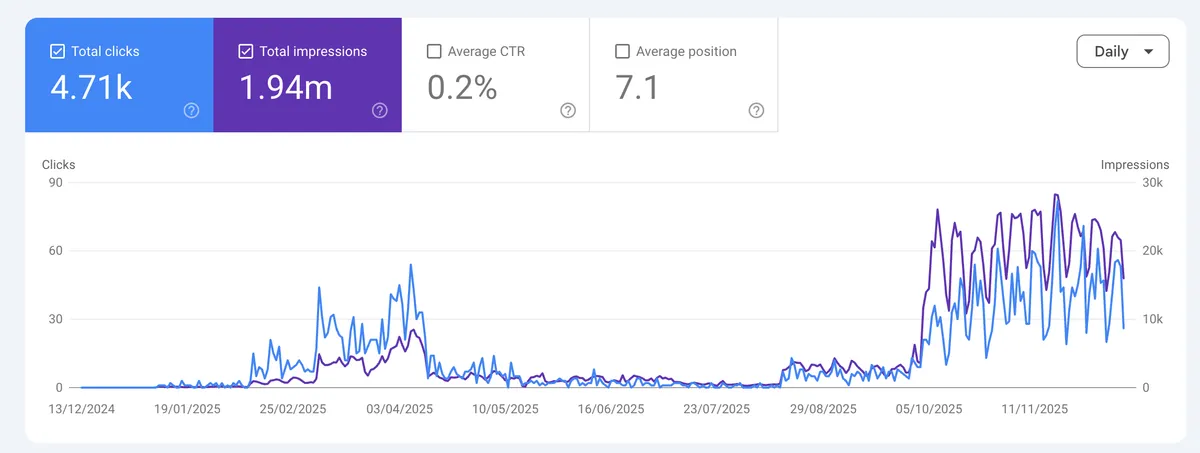
Looking at that chart, you can see it started getting some views in February, and so I turned my note on Cursor into a post sometime in March. Back then, Cursor was still quite new and was only on version 0.4.
What’s even more absurd is that you can see the views completely dropped off, and then surged again in October. I really don’t understand this one because Cursor is now on version 2. My post on version 0.4 was quite out of date, so I’m not sure why Google was continuing to rank my post that highly in its search results.
Looking at the stats, although I was getting a lot of page views it seemed everyone was immediately clicking back out of the post so I don’t think it was really that useful to anyone. I have now made an update to that post so it should be more relevant again.
I’ll be honest I haven’t been using my notes section as much as I was planning to, so no other notes got as much success, although I do have the occasional view on my camping in Hokkaido and car camping in my Jimny notes.
I think I definitely wouldn’t have bothered to write a blog post on Cursor since I felt quite late to using it and AI-aided programming in general, so I was surprised by the initial success of the note. So having a notes section turned out to be a pretty good idea.
Structuring my notes section: Zettelkasten vs PARA
So as well as updating the notes section on my blog, I wanted to figure out the best way to organise my Obsidian vault (where I do all of my writing) to make it as easy as possible to transfer over my notes. My vault really was quite messy, and it had been something on my to-do list to sort out by the end of the year.
At first, I started putting things into folders to have some sort of categorisation;
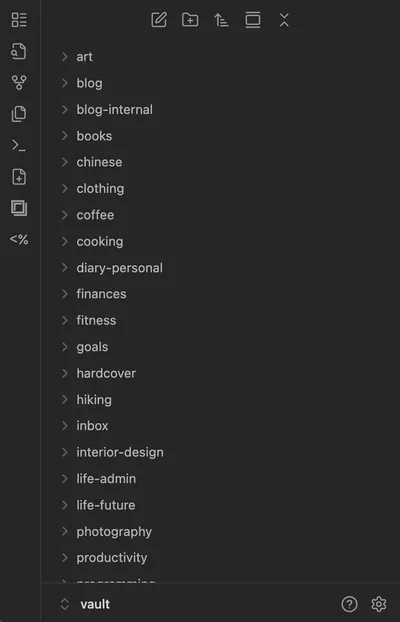
… but I got the same sort of feeling as shoving my clothes that were on the floor into a closet and it didn’t really feel any neater.
Over on Bluesky I decided to ask about how people organise their Obsidian vaults, and Bryan linked me his blog post on using Zettelkasten with Obsidian which got me thinking. I actually wrote about the Zettelkasten note-taking method 5 years ago and then never really put it into practice (it’s nice in theory, but maybe a bit harder to consciously do).
The overall approach with Zettelkasten boils down to:
- All notes should live in one folder - no subfolders allowed
- Notes should link out to other notes to create an interconnected web of notes
To be honest the original Zettelkasten linking system is a bit complex since it was completely paper-based (and done on index cards). A more recent and popular addition to the Zettelkasten method is the concept of having a “Map of Contents”, which are pages with links out to other notes. It’s a way to do a bit of organising without having folders.
The other contender that KJ and Brittany suggested was the PARA system. The letters stand for:
- **Projects: **things you are doing in the short-term with a fixed end date
- Area: things you are responsible for, like your health, or work or family
- Resources:general info on things you are learning about
- Archives: a dumping ground of stuff you no longer use but want to keep
You’re supposed to drag your files and folders into one of those four categories.
At first this made sense, but as I started to structure my notes this way, I started to find it hard to draw a line between an “area” and a “resource”. Which seems to be a common problem with PARA. What I’ve now settled on is a setup more like this:
- Projects: blog posts or tasks I want to finish in the short-term (a couple of months). These might include things I’ve already done but haven’t gotten around to writing about e.g. some new coffee beans that I bought recently that I wanted to review.
- Notes: Stuff that I could feasibly publish as a note on my blog at some point, but also includes plenty of unpublished stuff.
- Personal: Things that I would never publish on my blog e.g. super personal stuff, or my finance-tracking or my database of all the clothes I own (yep I do this, is that weird?)
- Archives: stuff I don’t really need anymore.
Here’s some of the stuff in my projects section right now:
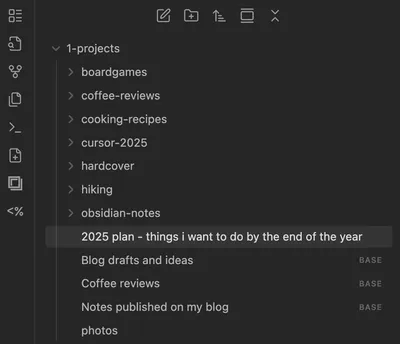
I’m trying to go a bit towards Zettelkasten in that inside of these folders I don’t get too structured with folders, and I use tags where possible.
Map of Contents and Obsidian Bases
I am also trying out the MOC (Map of Content) concept that I mentioned previously, where you create index pages which link out to other notes. Since Obsidian released their new Bases feature recently, this makes it easy to do.
As an example, I can make a list of all the notes that I have published to my blog:
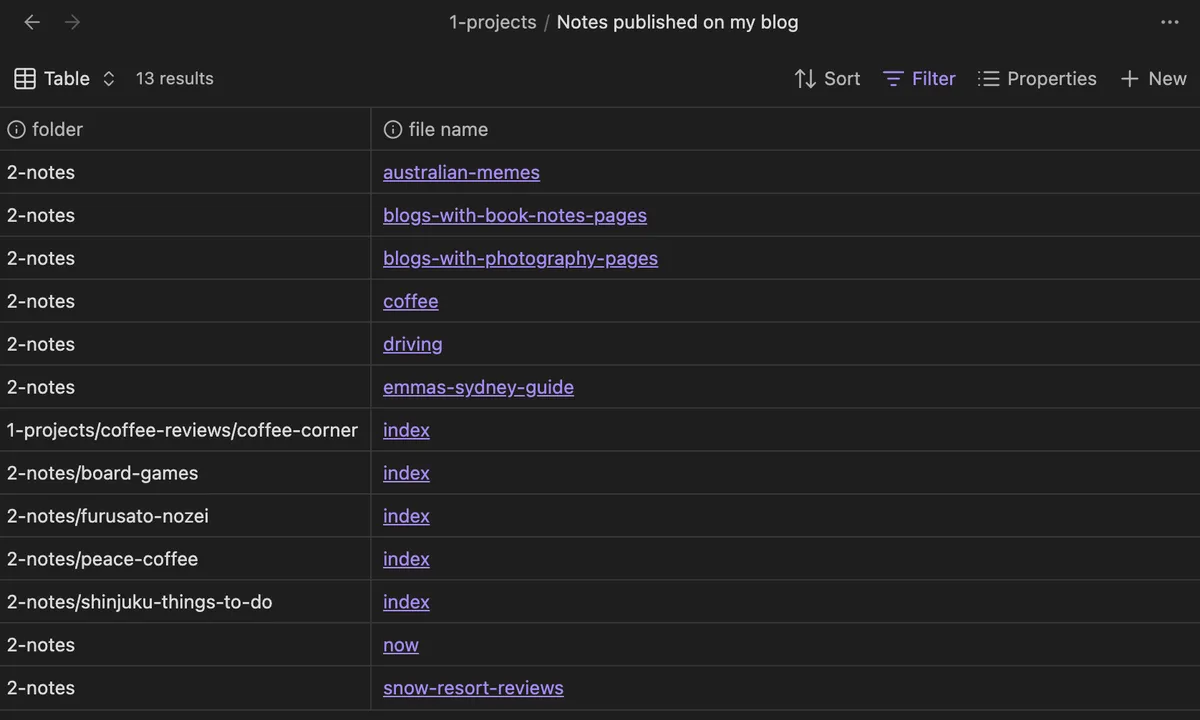
As I tag my notes, I can make similar MOCs that link out to all the notes with that particular tag. I’ll admit I haven’t been using this feature too much yet, so we’ll see if this is something I can make a habit of or not.
Publishing my notes from Obsidian to my blog
Now that I’ve started to get my notes organised in Obsidian, the next step is to figure out the best way to publish them to my blog. I’ve also written about this previously on my post on digital gardens with Obsidian, and the general approach I took there still works well for me, but with a few extra tweaks.
Previously, I had a “notes” folder in Obsidian and anything and everything in that folder would get copy-pasted across to my blog.
I’ve now added a new publish boolean to each of my notes:
---
title: My note's title
date: 2025-12-12
updated: 2025-12-12
publish: true
---

My note content goes here.
My Obsidian plugin will copy-paste any note with the publish value set to true across to my blog’s code repository.
This gives me a bit more flexibility to keep my Obsidian vault organised how I like, rather than having to split all my files by “published” or “not published”.
Categorising notes in lists
The final piece to my notes section is that I have some of my notes assigned sub-categories, like Driving in Japan or my Coffee Corner. Having a notes section on my blog is nice, but as I write more notes the discoverability of each of the notes will start to drop, so I wanted to add a bit more structure to it.
I took a semi-manual approach for this one.
For example my note on Peace Coffee beans is assigned to the coffee list:
---
title: Peace Coffee
list: ['coffee']
And then I have a separate file in my Obsidian for each list page, which I designate as such with isListPage;
---
title: Coffee Corner
list: ['coffee']
isListPage: true
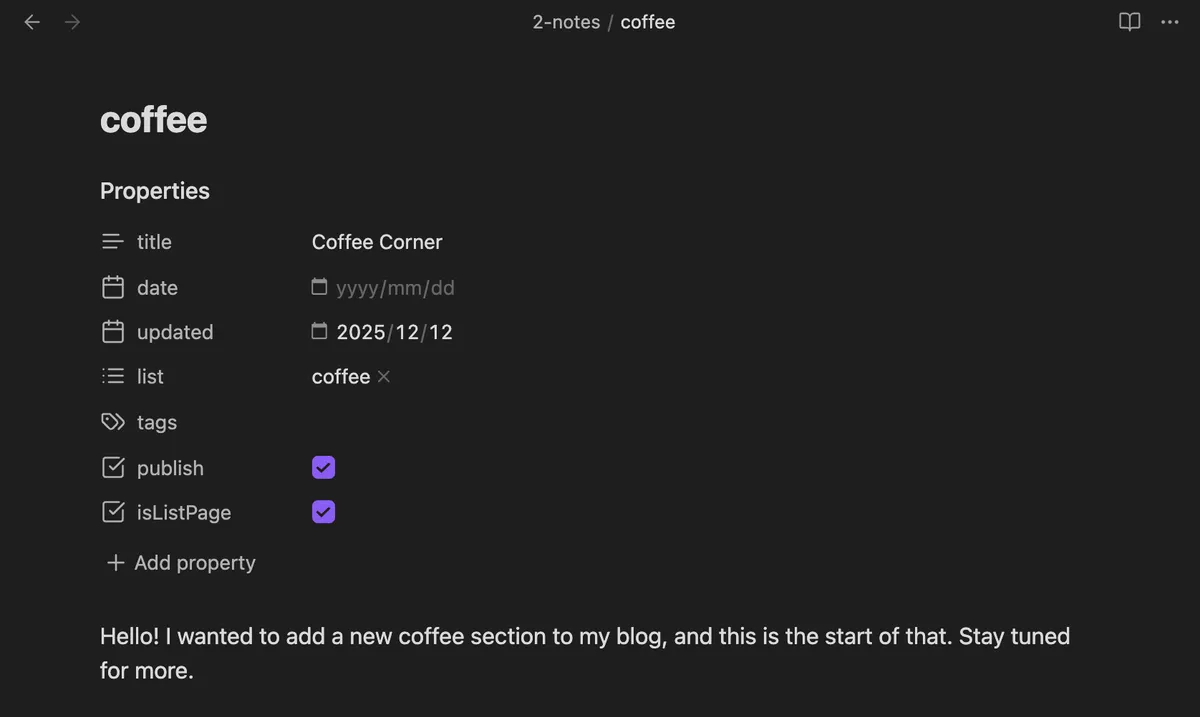
This Coffee Corner list page still functions like a regular note, and I can edit the description for it within Obsidian:
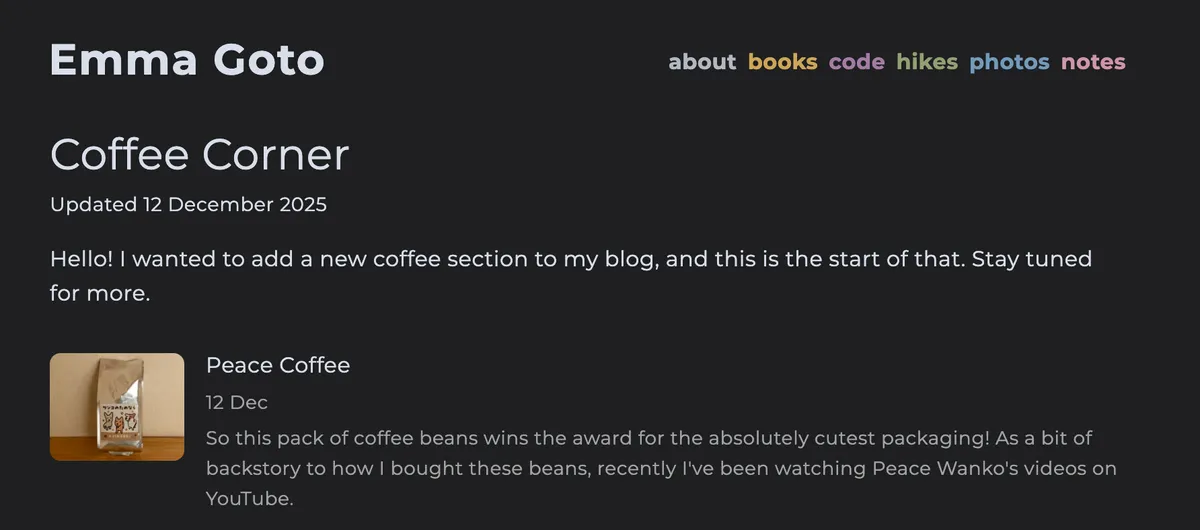
Then in my Astro blog code, I have some code that will generate the list of notes that belong to the coffee list and add it to the bottom of the Coffee Corner page for me:
<PostWrapper>
    <Content />
    {post.data.isListPage && <NotesList isListPage list={post.id}/>}
</PostWrapper>
{/* Not quite the full code, but you get the gist */}
So I don’t have to manually maintain this list myself (which I think is pretty neat).
I used to have a previous iteration of my blog open source but closed it over a while back since I didn’t want people running away with my hiking posts and photos. (Maybe an unwarranted fear). Sometimes I do wonder whether it would be useful to open back up to people so they can look at how I did the code for this themselves, although I get scared especially in this age of AI that someone will do something weird with it.
Anyway, this post got a little long-winded for what is a simple notes section, but thank you for reading to the end and nerding out on note-taking with me! Considering I managed to write this post literally 1 year after my last post on digital gardens, I may have to come back this time next year and write another follow-up post.